Marketplace Hub
Trendyol and Hepsiburada, on one screen.
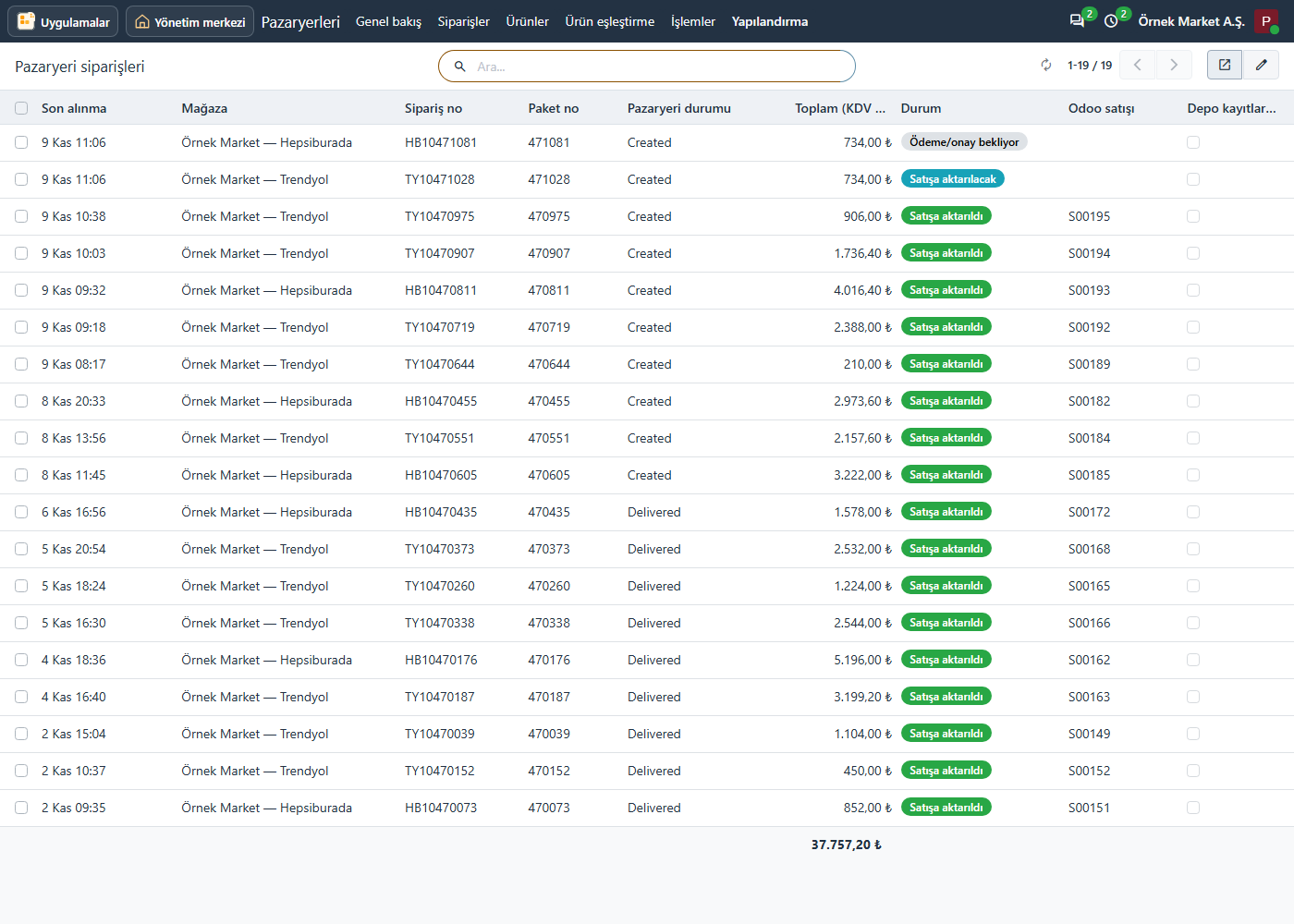
Your orders come in automatically, and stock and prices go out from your ONERP warehouse. Even if you sell the same product on several marketplaces, stock is managed in one place.
No manual copying, no stock confusion.
Orders arrive by themselves
Open, packed and cancelled orders are fetched every 5 minutes. They become sales orders after your approval, with VAT and amount checks.
One stock, all channels
For stores sharing a warehouse, an order from one is also deducted from the stock reported to the other marketplaces. This reduces the risk of overselling.
No duplicate sends
A request with an uncertain result is never retried automatically; every send is checked, and problems show up with a red alert.
Setup and products
Step-by-step connection wizard
Enter your store details and test the connection; the screen shows you the remaining steps one by one.
Bulk product import and matching
All store listings are matched to your ONERP products automatically by barcode and SKU; unmatched ones can be created in ONERP with one click.
Price per store
You can sell the same product at a different price on each marketplace; price and stock are sent separately for each store.
Trust and control
Live sending switch
You switch on stock and price sending per store; in test and copy environments sending is off automatically.
Alerts
Rejected operations, orders awaiting review or stalled syncs show up immediately on the overview screen.
Controlled order import
Orders with discounts, corporate invoices or incomplete addresses are not imported automatically; they wait for your review.
Ready to sell in four steps
1
Connect the marketplace
Enter the API details and test the connection.
2
Fetch products
Store listings are matched to your ONERP products.
3
Turn on orders
Automatic order fetching runs every 5 minutes.
4
Sync stock
Stock and prices of the products you choose are sent.
Marketplace questions
If you sell on another channel, write to us.
Trendyol and Hepsiburada today. For any other marketplace, such as Amazon, Etsy or eBay, tell us what you need and we will scope the connection together.
After "Fetch products", the "Create product" button opens an ONERP product card for unmatched items with the marketplace name, SKU, barcode, VAT and image.
No. Orders are fetched automatically; they become sales only with your approval. If the amount or VAT does not match the marketplace, no sale is created.
The marketplace closes a listing when stock 0 is reported. That is why ONERP warns you before switching on sync for products with zero stock; you can also set a safety stock and an upper limit.
Connect your store today.
Your trial environment comes with the Marketplace Hub installed; live sending stays off until you switch it on.